
What is authentication, authorization and accounting (AAA)?

Authentication, authorization and accounting (AAA) is a security framework for controlling and tracking user access within a computer network. AAA intelligently controls access to computer resources, enforces policies, audits usage and provides the information necessary to bill for services.
These combined processes are important for effective access management, network management and security. Network administrators use AAA to maintain network security, while ensuring that users have access to the resources they need. The framework also helps prevent unauthorized access to networks and resources by giving security teams control and visibility over user activity.
The AAA model progresses in chronological order from user authentication to authorization and then to accounting. The authentication process identifies a user, who is authorized to perform certain tasks, and the accounting process measures how many resources the user consumes. The AAA protocol is typically run on a server that automatically performs all three steps. The framework uses a client-server model for deploying the protocol. The AAA model uses a local database, automatic configuration server or dedicated AAA server.
What are the 3 A's of cybersecurity?
The three A's of cybersecurity are authentication, authorization and accounting.
Authentication
As the first process, authentication provides a way of identifying a user, typically by having them enter a valid username and password before access is granted. Other user authentication processes can be used instead, such as biometrics or a smart card.
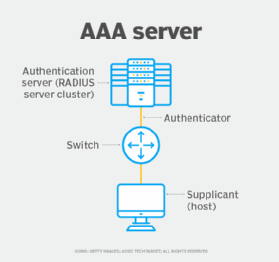
The authentication process is based on each user having a unique set of criteria for gaining access. The AAA server compares the user's credentials in the authentication request with other user credentials stored in a database. If the credentials match, the user is granted access to the network. If the credentials don't match, authentication fails, and the user is denied network access.
Once authenticated, the user is limited to performing actions that don't access specified data or resources configured by network administrators. The user's actions are also recorded for metrics such as resource consumption.
Authorization
Following authentication, the user must be authorized to perform certain tasks. After logging in to a system, for instance, they might try to issue commands. The authorization process determines whether the user has the authority to issue such commands. Simply put, authorization is the process of enforcing policies by determining what types or qualities of activities, resources or services the user is permitted. Authorization and user authentication work together in the AAA model; the user is authenticated first, and only then can they be authorized for different types of access or activity.
Accounting
Accounting measures the resources the user consumes during access. This can include the amount of system time or amount of data the user has sent and received during a session. Accounting logs session statistics and usage information and is used for authorization control, billing, trend analysis, resource utilization and capacity planning activities.
What is the importance of the AAA framework in network security?
Benefits that come with the AAA framework include the following:
- Improved network security. Every user must face credential-based authentication before gaining network access. AAA security processes also enforce the principle of least privilege, where users are provided with minimum levels of access.
- Protocol management. The protocol used for access control is standardized across an organization for system administrators.
- Flexible and granular control. Administrators and network security teams can determine the level of access each user has to network resources.
- Informed decision-making abilities. Administrators can make informed decisions on authorization, capacity planning and resource allocation based on data collected from the accounting step, where a user's activity and session statistics are logged.
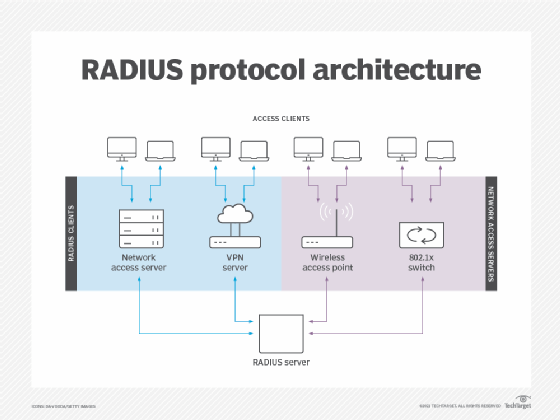
- Standardized authentication methods. Network access servers interface with the server using standardized protocols, such as Remote Authentication Dial-In User Service (RADIUS).
What are the AAA protocols?
Vendors of network security and access control products use the following three main types of standard network protocols in their products:
- RADIUS. RADIUS is a client-server protocol that lets remote access servers communicate with a central server for authentication. In the AAA process, RADIUS performs authentication and authorization simultaneously. After, a network access server receives and then accepts the user request.
- Terminal Access Controller Access Control System Plus. TACACS+ is a remote authentication AAA protocol that lets a remote access server communicate with an authentication server for user validation.
- Diameter. The Diameter AAA protocol evolved from the RADIUS protocol. Diameter adds new commands and attributes to the RADIUS protocol, such as capability negotiation, application-layer acknowledgments and failover methods.