collaboration diagram

What is a collaboration diagram?
A collaboration diagram, also known as a communication diagram, is an illustration of the relationships and interactions among software objects in the Unified Modeling Language (UML). Developers can use these diagrams to portray the dynamic behavior of a particular use case and define the role of each object.
To create a collaboration diagram, first identify the structural elements required to carry out the functionality of an interaction. Then build a model using the relationships between those elements. Several vendors offer software for creating and editing collaboration diagrams.
Notations of a collaboration diagram
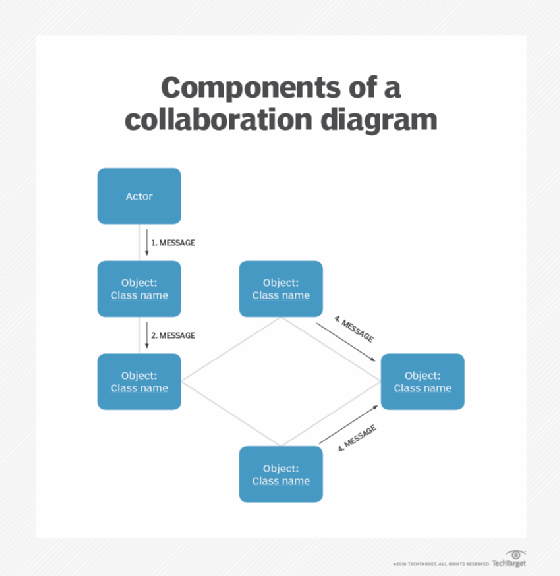
A collaboration diagram resembles a flowchart that portrays the roles, functionality and behavior of individual objects as well as the overall operation of the system in real time. The four major components of a collaboration diagram include the following:
- Objects. These are shown as rectangles with naming labels inside. The naming label follows the convention of object name: class name. If an object has a property or state that specifically influences the collaboration, this should also be noted.
- Actors. These are instances that invoke the interaction in the diagram. Each actor has a name and a role, with one actor initiating the entire use case.
- Links. These connect objects with actors and are depicted using a solid line between two elements. Each link is an instance where messages can be sent.
- Messages between objects. These are shown as a labeled arrow placed near a link. These messages are communications between objects that convey information about the activity and can include the sequence number.
The most important objects are placed in the center of the diagram, with all other participating objects branching off. After all objects are placed, links and messages should be added in between.
When to use a collaboration diagram
Developers should use collaboration diagrams when the relationships among objects are crucial to display. A few examples of instances where collaboration diagrams might be helpful include the following:
- Modeling collaborations, mechanisms or the structural organization within a system design.
- Providing an overview of collaborating objects within an object-oriented system.
- Exhibiting many alternative scenarios for the same use case.
- Demonstrating forward and reverse engineering.
- Capturing the passage of information between objects.
- Visualizing the complex logic behind an operation.
However, collaboration diagrams are best suited to the portrayal of simple interactions among relatively small numbers of objects. As the number of objects and messages grows, a collaboration diagram can become difficult to read and use efficiently. Additionally, collaboration diagrams typically exclude descriptive information, such as timing.
Collaboration vs. sequence diagrams
In UML the two types of interaction diagrams are collaboration and sequence diagrams. While both types use similar information, they display them in separate ways. Collaboration diagrams visualize the structural organization of objects and their interactions. On the other hand, sequence diagrams focus on the order of messages that flow between objects. In most scenarios, a single figure is not sufficient in describing the behavior of a system and both figures are required.
Editor's note: This article was reformatted to improve the reader experience.