
Sinisa Botas - Fotolia
What are the types of requirements in software engineering?
Requirements fall into three categories: business, user and software. See examples of each one, as well as what constitutes functional and nonfunctional kinds of software requirements.

A comprehensive set of requirements is crucial for any software project. Requirements identify the product's business needs and purposes at a high level. They also clarify the features, functionality, behaviors and performance that stakeholders expect.
Software requirements are a way to identify and clarify the why, what and how of a business's application. When documented properly, software requirements form a roadmap that leads a development team to build the right product quickly and with minimal costly rework. The actual types of software requirements and documents an IT organization produces for a given project depend on the audience and the maturity of the project. In fact, organizations often draft several requirements documents, each to suit the specific needs of business leaders, project managers and application developers.
Let's start with a look at several different types of requirements in software engineering:
- business
- user
- software
Then, explore common types of software requirements documentation, as well as tried-and-true characteristics to help define requirements.
Business requirements
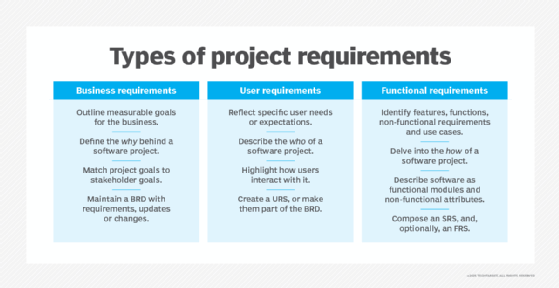
Business needs drive many software projects. A business requirements document (BRD) outlines measurable project goals for the business, users and other stakeholders. Business analysts, leaders and other project sponsors create the BRD at the start of the project. This document defines the why behind the build. For software development contractors, the BRD also serves as the basis for more detailed document preparation with clients.
A BRD is composed of one or more statements. No universally established format exists for BRD statements, but one common approach is to align goals: Write statements that match a project goal to a measurable stakeholder or business goal. The basic format of a BRD statement looks like:
"The [project name] software will [meet a business goal] in order to [realize a business benefit]."
And here's a detailed BRD statement example:
"The laser marking software will allow the manufacturing floor to mark text and images on stainless steel components using a suitable laser beam in order to save money in chemical etching and disposal costs."
For this example, the purpose of the proposed software project is to operate an industrial laser marking system, which is an alternative to costly and environmentally dangerous chemicals, to mark stainless steel product parts.
Organizations prepare a BRD as a foundation for subsequent, more detailed requirements documents. Ensure that the BRD reflects a complete set of practical and measurable goals -- and meets customer expectations.
Finally, the BRD should be a living document. Evaluate any future requirements, updates or changes to the project against the BRD to ensure that the organization's goals are still met.
User requirements
User requirements reflect the specific needs or expectations of the software's customers. Organizations sometimes incorporate these requirements into a BRD, but an application that poses extensive user functionality or complex UI issues might justify a separate document specific to the needs of the intended user. User requirements -- much like user stories -- highlight the ways in which customers interact with software.
There is no universally accepted standard for user requirements statements, but here's one common format:
"The [user type] shall [interact with the software] in order to [meet a business goal or achieve a result]."
A user requirement in that mold for the industrial laser marking software example looks like:
"The production floor manager shall be able to upload new marking files as needed in order to maintain a current and complete library of laser marking images for production use."
Software requirements
After the BRD outlines the business goals and benefits of a project, the team should devise a software requirements specification (SRS) that identifies the specific features, functions, nonfunctional requirements and requisite use cases for the software. Essentially, the SRS details what the software will do, and it expands upon or translates the BRD into features and functions that developers understand.
Software requirements typically break down into:
- functional requirements
- nonfunctional requirements
- domain requirements
Functional requirements. Functional requirements are statements or goals used to define system behavior. Functional requirements define what a software system must do or not do. They are typically expressed as responses to inputs or conditions.
A functional requirement can express an if/then relationship, as in the example below:
If an alarm is received from a sensor, the system will report the alarm and halt until the alarm is acknowledged and cleared.
Functional requirements may detail specific types of data inputs such as names, addresses, dimensions and distances. These requirements often include an array of calculations vital to the software working correctly.
Functional requirements are relatively easy and straightforward to test because they define how the system behaves. A test fails when the system does not function as expected.
Nonfunctional requirements (NFRs). Nonfunctional requirements relate to software usability. Nonfunctional software requirements define how the system must operate or perform. A system can meet its functional requirements and fail to meet its nonfunctional requirements.
NFRs define the software's characteristics and expected user experience (UX). They cover:
- performance
- usability
- scalability
- security
- portability
An example nonfunctional requirement related to performance and UX could state:
The pages of this web portal must load within 0.5 seconds.
Domain requirements. Domain requirements are expectations related to a particular type of software, purpose or industry vertical. Domain requirements can be functional or nonfunctional. The common factor for domain requirements is that they meet established standards or widely accepted feature sets for that category of software project.
Domain requirements typically arise in military, medical and financial industry sectors, among others. One example of a domain requirement is for software in medical equipment:
The software must be developed in accordance with IEC 60601 regarding the basic safety and performance for medical electrical equipment.
Software can be functional and usable but not acceptable for production because it fails to meet domain requirements.
Examples of software requirements
An SRS often describes the software as a series of individual functional modules. In the laser marking software example, an SRS could define these modules:
- the interface that translates marking image files into control signals for the laser beam;
- a UI that allows an operator to log in, select products from a library, and start or stop marking cycles; and
- a test mode to calibrate the system.
There are some industry standards for an SRS, such as ISO/IEC/IEEE 29148-2018, but organizations can still use a different preferred format for SRS statements. Here's one common approach:
"The [feature or function] shall [do something based on user inputs and provide corresponding outputs]."
And here are a few software requirements in the laser marking system:
"The laser marking operation shall translate AutoCAD-type vector graphics files into laser on/off control signals as well as X and Y mirror control signals used to operate the laser system."
"The software provides a visual feedback to the operator, who shall track and display the current state of the marking cycle overlaid on a graphic product image displayed on a nearby monitor in real time."
In addition to functional requirements, an SRS often includes nonfunctional requirements that identify attributes of the system or the operational environment. Nonfunctional requirements include usability, security, availability, capacity, reliability and compliance. They dictate development decisions and design requirements for the software, like password change frequency, data protection settings and login details.
A systems analyst or product manager typically puts together an SRS in collaboration with relevant stakeholders, such as the developer staff. Ideally, every requirement delineated in an SRS should correspond with business objectives a BRD outlines. For third-party software contractors, the completed SRS provides the basis for cost estimation and contract compliance.
While the SRS typically includes functional and nonfunctional requirements, some organizations might differentiate between an SRS and a functional requirements specification (FRS). In these cases, the FRS serves as a separate document and delves into the how of a software product. An FRS often stipulates all of the fields and user interactions throughout the entire software product.

Characteristics of good software requirements
All types of software requirements require significant prep work as part of the product development process. Additionally, such efforts force organizations to think about why to undertake a project, what the software product should provide, and how it will accomplish the desired goals. Requirements documents are a foundation upon which teams conceive, propose, budget and implement a software development project.
Have software requirements embody the following seven characteristics.
Clear and understandable. Software requirements must provide the utmost clarity. Write requirements in plain language, free of domain-specific terms and jargon. Clear and concise statements make requirements documents easy to evaluate for subsequent characteristics.
Correct and complete. The document should accurately detail all requirements. If it's a BRD, the document should detail all business goals and benefits. If it's an SRS, it should describe all features and functionality expected from the system. Use an easily readable format and go back to finish any to-be-determined entries. It rarely falls on one person to deliver a correct and complete software requirements document. Involve all relevant parties -- business leaders, project managers, development staff, customers -- in careful and ongoing requirements collaboration.
Consistent, not redundant. Software requirements documents are often long and divided into multiple parts -- each with its own specific requirements. Consistent requirements have no conflicts, such as differences in time, distance or terminology. For example, the difference between server and system will confuse some team members, so use only one to refer to the physical machine in the data center running the software. Only state a requirement once; don't duplicate it. Redundant requirements often lead to errors if, in the course of the project, the team changes or updates an iteration and the manager forgets to change or update repeated entries elsewhere in the document.
Unambiguous. No software requirement can leave room for interpretation. Even clear statements can still be subject to multiple interpretations, which leads to implementation oversights. For example, it might be clear to require that a function, like a mathematical process, should be performed on a temperature measurement, but a requirement must specify the temperature measurement as degrees in Fahrenheit, Celsius or Kelvin. Phrase each statement so that there is only one possible interpretation. Collaboration and peer reviews help ensure unambiguous requirements documentation.
Design-agnostic. Software requirements documents should illustrate an end result. Like an architectural diagram, the different types of requirements together detail what the development team should build and why, but rarely explain how. Empower developers to select from various design options during the implementation phase of the software project; don't stipulate specific implementation details unless they're necessary to satisfy business goals. A business might, for example, prohibit developers from using open source components in a project, as the approach conflicts with its ability to sell or license the finished project.
Measurable and testable. The goal of a requirements document is to provide a roadmap for implementation. Eventually, teams must evaluate a completed project to determine whether the effort is successful -- for this, they must be able to objectively measure statements. As an example, a requirement like, "must start quickly" is not measurable. Instead, use a quantifiable requirement such as, "must initialize and be ready to accept network traffic within five seconds." This characteristic is particularly important for work done by software subcontractors, as unmeasurable statements can lead to cycles of costly rework. Prepare a software requirements document with testing in mind. Each statement should enable the team to create test plans and test cases that validate the completed build.
Traceable. It's hard to know when developers are actually done with a software project. Ideally, there will be a direct connection between requirements documents and finished code; a project manager should be able to follow the provenance of a project from a requirement to a design element to a code segment, and even to a test case or protocol. When a requirement does not trace to the finished code, the development team might not implement it, and the project could be incomplete. Code that is present without a corresponding requirement might be superfluous -- or even malicious. Conversely, when a project manager sees all requirements reflected in the finished code and it passes testing, the project is complete.