Defining report requirements with use cases
This tip offers a new and interesting way to go about defining and reporting requirements for use cases. There are a number of details that need to be attended to in defining requirements such as taking a look at users and then constructing use cases.

In any system or software development effort, there are typically many users' needs to consider. Sometimes developers only think of users' functionality needs and give short shrift to their information needs, their need for reports, and often fail to construct or use an appropriate approach for defining necessary reports. The good news is that there is at least one existing software development practice that fits the bill: the use case. Since most reports are developed with some audience in mind, the use case technique is definitely one that should be explored.
In this tip, I'll share the results of my explorations of using use case techniques to define reports, such as my report case use pattern diagram and report definition matrix.
First, let's think about what a report really is and what a use case is intended to do. A report is a collection of information that can be sliced, formatted and delivered in all sorts of different ways (paper, online and so forth). A use case is a simple but powerful technique which exposes what the user has to be able to do -- with the software's help, of course. So, a use case might identify a user task, such as "view customer information," which could eventually be implemented as a paper and/or online report.
Let's be clear before going further that use cases aren't the be-all and end-all in defining reports. While I'm a fan of the use case technique because it focuses on the user, effective requirement definition takes more than one approach. There is considerable information about a report that is not conveniently captured in a user's request to "view customer information" – or, use case. You might think of this information as metadata about a particular collection of information. For instance, you probably need to capture a report purpose, provider and receiver, delivery frequency, trigger(s), criteria for filter(s) and other things that need to be determined ahead of time.
Now, having to deal with all this additional report information does not take the use case technique off the table, but it does emphasize that just describing the user task, "view customer information," is not sufficient.
A common way to document reports is to create a report definition template to capture this descriptive information, but this approach does not facilitate looking across a collection of reports to spot something that is missing, inconsistent or might be consolidated. Let me share two techniques I have used successfully: a report use case pattern and a report definition matrix.
Report use case pattern
I am always looking for patterns, patterns in words or patterns in steps in a process. About the same time I realized that a report was really just a collection of fill-in-the-blank information, I also realized that when a user asks to "view _______ information" there are some typical steps. This "aha" quickly prompted me to define a pattern for any "View _______ information" use case. I found that the pattern was quite simple, whereas my previous thought, that I had to capture all the possible combinations, was daunting. As it turns out, documenting all the possible combinations would not be all that helpful. Keep in mind that the pattern below is a starting point intended to bring simplicity and consistency to the steps of this type of user task.
Report Use Case Pattern: "View _____ information"
| Step |
Description |
| 1. User requests "view _____ information" action. |
"Request 'view _____ information'" is the ability to ask for _____ information. |
| 2. System provides categories of _____ information requesting selection. |
Request selection of one and only one of the following categories of information: |
| 3. User selects information category. |
Select one and only one of the following categories of information: |
| 4. System determines viewing options based on selected information category. |
"Determine viewing options" is the ability to conclude which way the selected information category will be presented. |
| 5. System provides viewing options requesting selection. |
Request selection of one and only one of the following viewing options: |
| 6. User selection viewing option. |
Select one and only one of the following viewing options: |
| 7. System provides selected information category using selected viewing option. |
"Provide the selected information category using the selected viewing option" is the ability to present the selected information in the requested manner. |
Note that when selecting an information category or viewing option, it may not be necessary to limit the choice to 'one and only one'. It may be appropriate to state 'one or more' or 'up to three' as a precise directive to the user.
Report definition matrix
The report definition matrix below took shape on a real project after a number of general, often circular, report discussions. As you will notice in this example, the information about the report is categorized in collapsible columns in an Excel spreadsheet. A more sophisticated approach could be used if you had other tools at your disposal, but the same principles of grouping information and having selectable choices can apply whichever method you use.
Take a moment to just glance at the types of information captured and note that each report is uniquely identified.
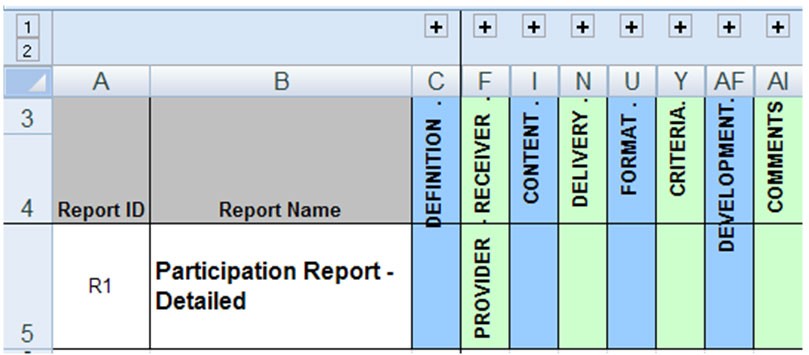
Now, let's expand each section of this report definition example. You will notice in the DEFINITION and PROVIDER-RECEIVER section that some columns have a list of valid values. One is Data Validation: List to identify the permissible values in an area not included in the Print Area. As this particular report definition matrix matured, these lists matured. </p>
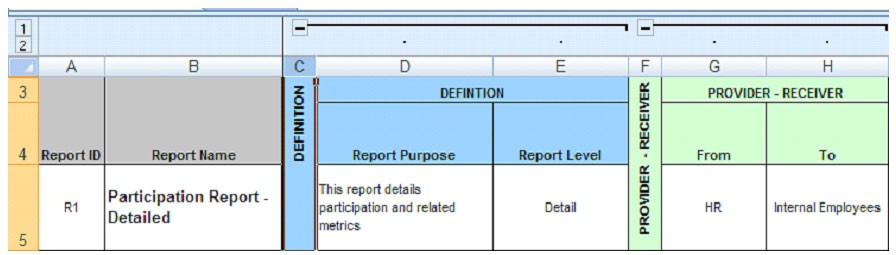
Note below that the report data CONTENT is only referenced because, in this situation, there was already a group and a mechanism -- Report Data Definition -- to list the specific data needed for a report. Oddly enough, this group did not have a need to know who the report was for or its purpose. Also note the different aspects of DELIVERY.

In the FORMAT and CRITERIA sections, some of the columns cross the boundary between describing what and how. When defining a new report, the requirements should document that the format must follow accepted standards, but they do not need to specify if the orientation is landscape or portrait. When documenting an existing report, you already have this design information. Ask yourself if this information would be helpful. If the answer is yes, then capture it but recognize this is report design information. Also notice that some of the CRITERIA information, such as the filters and sorting, provides the viewing options referred to in the report use case pattern.

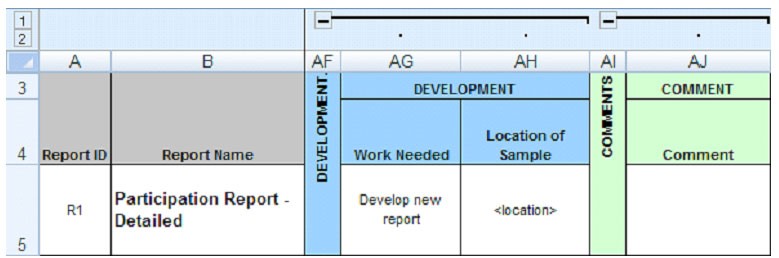
The last sections for DEVELOPMENT and COMMENT definitely reflect the situation from which this example was drawn. There was a need for some new reports, but many of the existing reports were either good as is or needed some modification. Since this matrix was to be used to help with estimating the work effort, the DEVELOPMENT columns were added. And, of course, there always needs to be a place to COMMENT, especially when a matrix such as this one has not fully matured.
Reports definition via use cases: A repeatable process
Leveraging report use cases in conjunction with a report definition matrix will help keep the focus on developing a minimum set of useful output rather than a disjointed proliferation of reports that ends up filling a corner of someone's office. Years ago, I moved into a cube that had previously been used for report storage. It took filling a huge recycle bin for three days in a row before I could finally move around my cube without stepping over a pile of paper!
Whether you are defining reports for a new system or software application or an existing one, look beyond your current assignment. Report use cases and the report definition matrix can be useful after the initial development effort. Some potential ways to utilize these use cases and the report definition matrix are to:
Develop a user guide.
- Train new employees.
- Provide a basis for regression testing
- Have report requirements for a replacement system.
For all of the above, capturing the "what" is essential and capturing the "how" is optional; see the FORMAT section above for an example. If the requirements that you are capturing -- and that is what you are capturing in a use case -- are ever to be used for a replacement system, any "how" statements can introduce unnecessary design constraints for the replacement.
With all this in mind, consider the following report definition approach:
Make the report definition matrix your own. Remove the parts that do not apply and refine the parts that are not quite right in your situation.
For each report fill out your report definition matrix or use it as a guide to asking questions. For those reports that are not yet specified, consider including at least a row that acknowledges their existence and provides a place to reference where more information can be found.
Name the report use cases "View _______ information." Before you make each report use case more than a name, ask yourself if the report definition matrix provides the report information needed for now.
If yes, include the "View _______ information" use cases but put a reference to the report definition matrix in the body of the use case.
If no, leverage the report use case pattern and the report definition matrix to provide all the necessary information about the user task and report metadata.
Having a defined approach for articulating report requirements will not only help you clearly document report specifics, but it will also help others recognize and maintain their focus on the reports essential to your business.
About the author: Betty Luedke is a project manager and requirements analyst with 22 years experience in the software development industry. Her broad experience in the analysis, design and development of object-oriented, relational, and hierarchical data systems for consumer finance, engineering, and medical functions has enabled her to effectively keep the user foremost when applying requirements management (RM) best practices in real product development situations.
====From previous version====
Software requirements gathering: |
| Requirements gathering, SRS and use cases |