software testing

What is software testing?
Software testing is the process of assessing the functionality of a software program. The process checks for errors and gaps and whether the outcome of the application matches desired expectations before the software is installed and goes live.
Why is software testing important?
Software testing is the culmination of application development through which software testers evaluate code by questioning it. This evaluation can be brief or proceed until all stakeholders are satisfied. Software testing identifies bugs and issues in the development process so they're fixed prior to product launch. This approach ensures that only quality products are distributed to consumers, which in turn elevates customer satisfaction and trust.
To understand the importance of software testing, consider the example of Starbucks. In 2015, the company lost millions of dollars in sales when its point-of-sale (POS) platform shut down due to a faulty system refresh caused by a software glitch. This could have been avoided if the POS software had been tested thoroughly. Nissan also suffered a similar fate in 2016 when it recalled more than 3 million cars due to a software issue in airbag sensor detectors.
The following are important reasons why software testing techniques should be incorporated into application development:
- Identifies defects early. Developing complex applications can leave room for errors. Software testing is imperative, as it identifies any issues and defects with the written code so they can be fixed before the software product is delivered.
- Improves product quality. When it comes to customer appeal, delivering a quality product is an important metric to consider. An exceptional product can only be delivered if it's tested effectively before launch. Software testing helps the product pass quality assurance (QA) and meet the criteria and specifications defined by the users.
- Increases customer trust and satisfaction. Testing a product throughout its development lifecycle builds customer trust and satisfaction, as it provides visibility into the product's strong and weak points. By the time customers receive the product, it has been tried and tested multiple times and delivers on quality.
- Detects security vulnerabilities. Insecure application code can leave vulnerabilities that attackers can exploit. Since most applications are online today, they can be a leading vector for cyber attacks and should be tested thoroughly during various stages of application development. For example, a web application published without proper software testing can easily fall victim to a cross-site scripting attack where the attackers try to inject malicious code into the user's web browser by gaining access through the vulnerable web application. The nontested application thus becomes the vehicle for delivering the malicious code, which could have been prevented with proper software testing.
- Helps with scalability. A type of nonfunctional software testing process, scalability testing is done to gauge how well an application scales with increasing workloads, such as user traffic, data volume and transaction counts. It can also identify the point where an application might stop functioning and the reasons behind it, which may include meeting or exceeding a certain threshold, such as the total number of concurrent app users.
- Saves money. Software development issues that go unnoticed due to a lack of software testing can haunt organizations later with a bigger price tag. After the application launches, it can be more difficult to trace and resolve the issues, as software patching is generally more expensive than testing during the development stages.
Types of software testing
There are many types of software testing, but the two main categories are dynamic testing and static testing. Dynamic testing is an assessment that's conducted while the program is executed; static testing examines the program's code and associated documentation. Dynamic and static methods are often used together.
Over the years, software testing has evolved considerably as companies have adopted Agile testing and DevOps work environments. This has introduced faster and more collaborative testing strategies to the sphere of software testing.
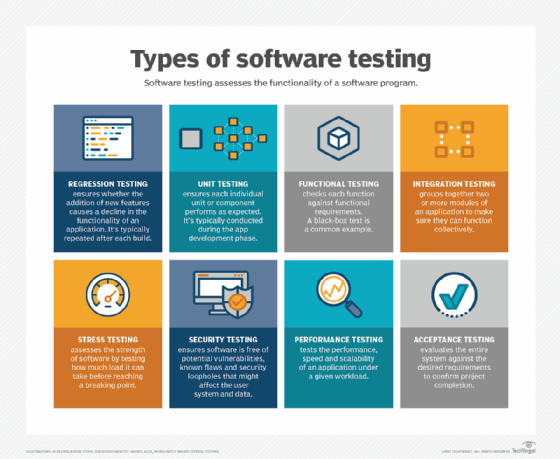
The following are the main types of software testing methodologies:
- Integration testing. This groups together two or more modules of an application to ensure they function collectively. This type of testing also reveals interface, communication and data flow defects between modules.
- Unit testing. Typically conducted during the application development phase, the purpose of unit testing is to ensure that each individual unit or component performs as expected. This is a type of white box testing and test automation tools -- such as NUnit, JUnit and xUnit -- are typically used to execute these tests.
- Functional testing. This entails checking functions against functional requirements. A common way to conduct functional testing is by using the black box testing
- Security testing. This ensures the software is free of potential vulnerabilities, known flaws and security loopholes that might affect the user system and data. Security testing is generally conducted through penetration testing.
- Performance testing. This tests the performance and speed of an application under a given workload.
- Regression testing. This verifies whether adding new features causes a decline in the functionality of an application.
- Stress testing. This assesses the strength of software by testing how much load it can take before reaching a breaking point. This is a type of nonfunctional test.
- Acceptance testing. This evaluates the entire system against the desired requirements and ensures the project is complete.
What can be automated within software testing?
Automated testing can be used to test larger volumes of software when manual testing becomes tedious and time-consuming. Test scripts can be run automatically on software applications, which frees up time and resources and enables companies to test efficiently at lower costs.
Many QA teams build in-house automated testing tools so they can reuse the same tests repeatedly and deploy them around the clock without time constraints. Most vendors also offer features for streamlining and automating tasks. For automated testing of web application frameworks, tools such as Java for Selenium are often used.
The following are five ways in which automation can aid in the software testing process:
- Continuous testing. This type of automated testing is performed on every piece of software a developer delivers. It offers error detection and validation of code early in the process. To make the process continuous and rapid, the test automation is integrated with the deployment process and is done at every stage of development -- initial stages of software development to the deployment of software.
- Virtualization of service. The initial stages of software development can lack certain test environments, hindering the ability of teams to test efficiently and early in the process. This gap can be filled by service virtualization, as it can simulate those services or systems that aren't developed yet. This encourages organizations to make test plans sooner rather than wait for the entire product to be developed. Virtualization also offers the added benefit of reusing, deploying or changing the testing scenarios without affecting the original production environment.
- Bug and defect tracking. Automation testing is great for detecting bugs that manual testing can sometimes miss, such as memory leaks. The automated tests are run hundreds of times in a short period, which can find these issues quicker. As a part of automation testing, regression testing is performed after each build, which ensures old bugs don't reappear. Another advantage of automated software testing is the rapid notification to developers in the event of a failed test, as opposed to waiting for manual testing results to arrive. This is especially important for those products that go through frequent updates.
- Reporting and metrics. Both reporting and metrics play a vital role when it comes to the automation framework. Advanced tools and analytics are used in automated testing for integrating metrics that can then be shared with everyone in the form of test results and status reports. This enables entire teams to analyze the health of a project and coordinate between different departments instead of singular developers looking at the results, as is the case with manual testing.
- Configuration management. Automated software testing provides great visibility across all test assets, including code, design documents, requirements and test cases. This offers centralized management where all teams across the organization can track and collaborate during different phases of development.
Best practices for software testing
There's more to software testing than running multiple tests. It also entails using a specific strategy and a streamlined process that helps to carry out these tests methodically. To improve the performance and functionality of any application or product, software best practices should always be followed.
The following are a few best practices to consider to help ensure successful software testing projects:
- Incorporate security-focused testing. Security threats are constantly evolving. To protect software products from digital threats, security-focused tests should be conducted along with regular software tests. Penetration testing or ethical hacking can help organizations evaluate software integrity from a security standpoint and understand any weaknesses.
- Involve users. Since users are the best judge of a software product, developers need to keep the communication channels open with them. Asking open-ended questions -- such as what issues users run into while using the product and the type of features they would prefer to see -- can help conduct testing from the user's perspective. Creating test accounts in production systems that simulate the user experience is also a great way to incorporate their feedback for successful software testing.
- Keep the future in mind. The world of technology is constantly evolving and any new product on the market should be scalable and adaptable to changing demands. Before developing a product, developers should keep the future and adaptability features in mind. This can be ensured by the type of architecture used and the way the software is coded. A futuristic product shouldn't only be tested for bugs and vulnerabilities, but for scalability factors as well.
- Programmers should avoid writing tests. Tests are typically written before the start of the coding phase. It's best practice for programmers to avoid writing those tests, as they can be biased toward their code or might miss other creative details in the test sets.
- Perform thorough reporting. Bug reporting should be as detailed as possible so people responsible for fixing the issues can decipher them easily. A successful report should be balanced and reflect on the severity of issues, prioritize the fixes and include suggestions to prevent those bugs from reappearing.
- Divide tests into smaller fractions. Smaller tests save time and resources especially in environments where frequent testing is conducted. By breaking down longer tests into various sub-tests, such as user interface testing, function testing, UX testing and security testing, teams can make a more efficient analysis of each test.
- Use two-tier test automation. To cover all bases, organizations should use a two-way approach to software testing. Quick sanity checks on each commit to the source code, followed by extensive regression testing during off hours, is a great option. This way developers get instant feedback on the current portion of the code and can fix it immediately instead of backtracking for errors later down the road.
- Don't skip regression testing. Regression testing is one of the most important steps to take before an application can finally move to the production phase and it shouldn't be skipped. Since most of the testing has been done before regression testing, it encourages the validation of the entire application.
History of software testing
Computer scientist Tom Kilburn wrote the first piece of software code in 1948 at the University of Manchester in England. Software testing started during the same timeframe but was restricted to debugging only. By the 1980s, development teams started to incorporate a more comprehensive process for isolating and fixing bugs and doing load testing in real-world settings. This brought software testing to the forefront. In the 1990s, the QA process was born and testing became an integral part of the software development lifecycle.
While manual software testing works great for code validation, automated testing is better for verification purposes. Learn when to choose automated testing over manual testing.